Map Matching API
Endpoint
The endpoint is https://HOSTNAME/match
You get an example response for a GPX via:
curl -XPOST -H "Content-Type: application/gpx+xml" "https://[HOSTNAME]/match?vehicle=[PROFILE]" --data @/path/to/some.gpx
Introduction
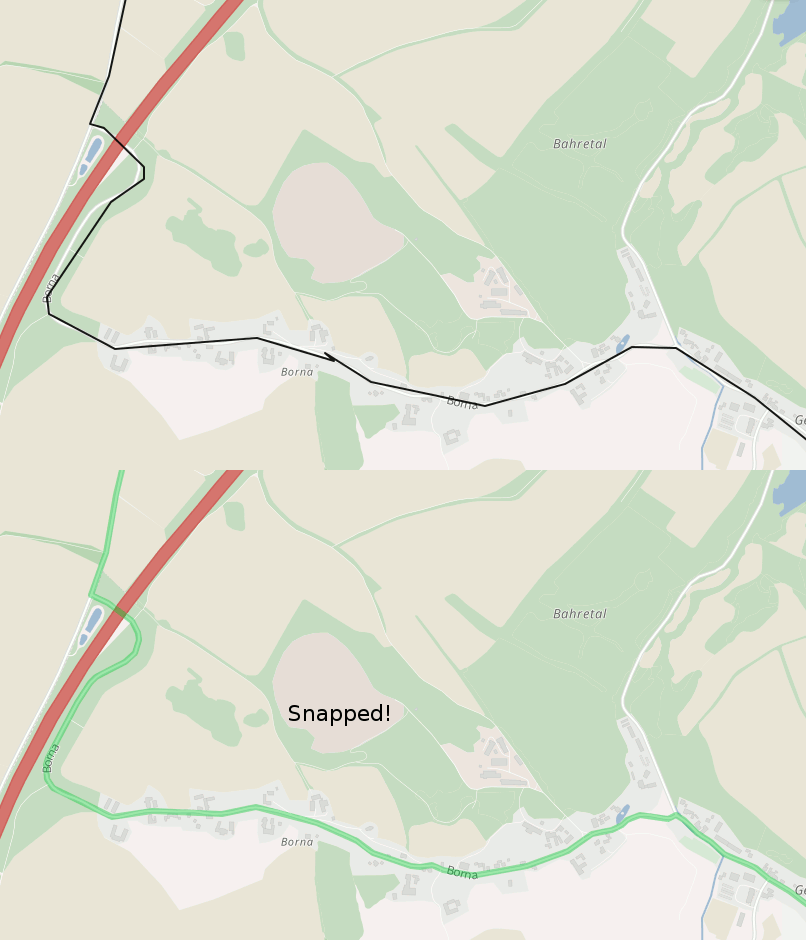
The Map Matching API is part of the OpenRailRouting REST API and with this API you can snap measured GPS points typically as GPX files to a digital road network to e.g. clean data or attach certain data like elevation or turn instructions to it. Read more at Wikipedia.
In the example screenshot above and demo you see the Map Matching API in action where the black line is the GPS track and the green one is matched result.
API Clients
See the clients section in the main document.
Description
The Map Matching API snaps real word measurements in form of GPX tracks to the digital road network to clean up this data or attach data to it.
Input format
The supported input formats are GPX 1.1 (application/gpx+xml) and a custom CSV format (text/csv). A json format is under work.
Parameters
All parameters are shown in the following table:
| Parameter | Default | Description |
|---|---|---|
| gps_accuracy | 40 | The precision of the GPS locations in meters, from minimum of 5 to maximum 100. |
| profile | car | The vehicle for which the route should be snapped. See here for all options. |
| locale | en | The locale of the resulting instructions |
| type | json | The output format, can be gpx, json or csv. |
| fill_gaps | false | If false, return an error if the distance between two subsequent points is too large. If true, try a normal routing request to fill the gap. |
| debug | false | If true, the output will be formated. |
| max_visited_nodes | 3000 | The maximum number of nodes in graph which should be visited until a request fails. |
Further parameters from the Routing API do apply here too.
CSV Input
Following additional parameters are supported for the CSV input format:
| Parameter | Default | Description |
|---|---|---|
| csv_input.separator | ; | column separator |
| csv_input.quoteChar | " | quotation character |
The CSV file must have column headers.
Following column headers are expected:
latitudelongitude
Any other columns will be ignored.
CSV Output
Following additional parameter is supported for the CSV output format:
| Parameter | Default | Description |
|---|---|---|
| csv_output.separator | ; | column separator |
CSV Input
The CSV file must have column headers.
Following column headers are expected:
latitudelongitude
Any other columns will be ignored.
CSV Output
The map matching API supports a CSV output format. The CSV files contain two columns latitude and longitude.
They have a column header. Columns are separated by ; by default but you can use the query parameters to request
a different character.
JSON Output
The output is currently the one of the Routing API, plus the map_matching entry.
See here the most important entries:
| JSON path/attribute | Description |
|---|---|
| paths | An array of possible paths |
| paths[0].distance | The total distance of the route, in meter |
| paths[0].time | The total time of the route, in ms |
| paths[0].points | This value contains the coordinates of the path. If points_encoded=true or no points_encoded specified an encoded string will be returned, otherwise an array with order [lon,lat,elevation] is returned. See the parameter points_encoded for more information. |
| paths[0].instructions | Contains information about the instructions for this route. The last instruction is always the Finish instruction and takes 0ms and 0meter. Keep in mind that instructions are currently under active development and can sometimes contain misleading information, so, make sure you always show an image of the map at the same time when navigating your users! |
| map_matching.distance | The distance in meter of the matched path |
| map_matching.time | The time in ms of the matched path |
| map_matching.original_distance | The distance in meter of the original track |
| map_matching.original_time | The time in ms of the original track |
HTTP Error codes
See more details in the overview